
Regular Expressions
Series: Regular Expressions — Reordering Captured Text in Replacements

In the previous article, Finding Dates with a Single Pattern, we built a regular expression that can match numeric dates such as:
using:
\d{1,2}/\d{1,2}/\d{4}
In this article, we will go one step further.
Suppose we want to take:
9/1/2026
and turn it into:
2026-9-1
We do not want to replace the date with a fixed string. We want to keep the month, day, and year that were actually found, but put them back in a different order.
That is where capture groups come in.
Put the parts you want to keep inside parentheses
Our original pattern was:
\d{1,2}/\d{1,2}/\d{4}
The three pieces we want to reuse later are:
- the month
- the day
- the year
So we put each of those parts inside parentheses:
(\d{1,2})/(\d{1,2})/(\d{4})
All we have done is add three pairs of parentheses.
When part of a regular expression is placed inside parentheses like this, the text matched by that part can be reused later.
For the date 9/1/2026:
- (\d{1,2}) matches
9 - the second (\d{1,2}) matches
1 - (\d{4}) matches
2026
Think of these as three temporary boxes.
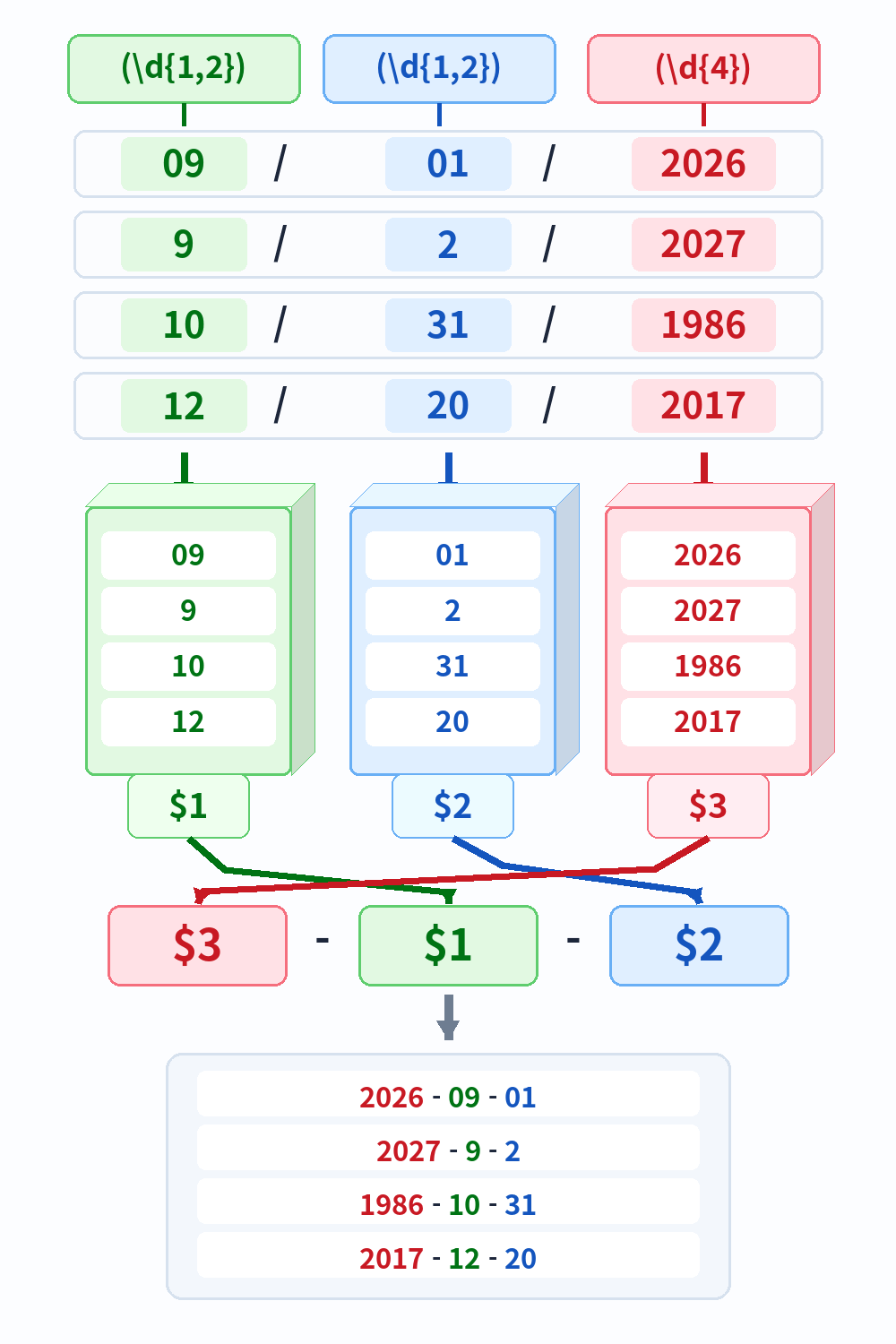
Figure 1. The parenthesized parts are stored as $1, $2, and $3, then put back in a new order during replacement.
| Group | What it contains | For 9/1/2026 |
|---|---|---|
| $1 | Month | 9 |
| $2 | Day | 1 |
| $3 | Year | 2026 |
The groups are numbered from left to right.
These parenthesized parts are called capture groups.
The terminology sounds more technical than the idea itself. For now, it is enough to think of them as:
Put the text I will need later into numbered boxes.
Take the contents back out with $1, $2, and $3
Now we have:
- month in $1
- day in $2
- year in $3
To create a year-month-day format, we can use the replacement string:
$3-$1-$2
That means:
- $3 →
2026 - $1 →
9 - $2 →
1
The result is:
2026-9-1
Nothing is being recalculated. We are simply taking the three captured pieces and inserting them in a new order.
Note: the syntax for referring to capture groups depends on the tool.
In this article, we use $1, $2, and $3, which is the replacement syntax used by memoQ and .NET-style regular expressions. Other tools may use forms such as \1, \2, and \3 instead.
If you work in a Japanese environment, a backslash \ may sometimes be displayed as a yen sign ¥, depending on the font or application.
The same search can produce different output formats
The search pattern can stay exactly the same:
(\d{1,2})/(\d{1,2})/(\d{4})
Only the replacement changes.
For example:
- $3-$1-$2 →
2026-9-1 - $2/$1/$3 →
1/9/2026 - $3/$1/$2 →
2026/9/1
We are not searching for the month, day, and year again. We are simply deciding how to reuse the three pieces that were already captured.
What happens to the separators?
Look again at the search pattern:
(\d{1,2})/(\d{1,2})/(\d{4})
The slashes are part of the search pattern, but they are not inside the capture groups.
That means they help us find the original date, but they are not stored in $1, $2, or $3.
This lets us distinguish between:
- characters needed to identify the original pattern; and
- text we want to keep and reuse in the replacement.
That distinction is one of the most useful parts of capture-group replacement.
The contents of $1, $2, and $3 change every time
$1 does not always mean 9.
For 12/31/2025:
- $1 →
12 - $2 →
31 - $3 →
2025
For 1/10/1999:
- $1 →
1 - $2 →
10 - $3 →
1999
The group references do not stand for fixed values. They refer to whatever text happened to be captured in that match.
If you have some programming experience, you can think of them as being somewhat similar to temporary variables.
Replacement does not “understand” the text
This point is worth keeping in mind.
If the input is:
09/01/2026
and the replacement is:
$3-$1-$2
the result will be:
2026-09-01
not:
2026-9-1
The capture groups store the text that was matched. They do not decide that a leading zero is unnecessary, perform arithmetic, or interpret the value as a calendar date.
They simply reuse the text that was captured.
Where is this useful in real work?
Dates are a convenient teaching example, but capture groups are not limited to numbers.
You can also capture words such as portion or electrode, as well as multi-word noun phrases, and reuse them in a different part of the replacement.
For example, suppose a technical document repeatedly contains a structure such as:
the portion where an electrode is provided
and you want to normalize it to:
the portion on which an electrode is provided
The exact nouns do not necessarily have to stay the same in every sentence. If portion or electrode changes to another word or noun phrase, the changing parts can still be captured and inserted back into the replacement.
In other words, regular expressions are useful not only when the exact text repeats, but also when the structure stays the same while some of the words change.
Searching for words and noun phrases
In this article, we have deliberately used numbers so that the capture-and-replace mechanism is easy to see. How to build regular expressions that match changing words, noun phrases, and other kinds of text will be covered in a future article.
This type of operation can be useful in translation and QA work, where the wording may vary but the underlying structure repeats across many segments.
memoQ’s Find and Replace feature can also use capture groups in this way. As with any large-scale replacement, it is a good idea to review the matches before replacing them all.
What to remember
The key idea is simple.
Put the parts you want to reuse inside parentheses:
(\d{1,2})/(\d{1,2})/(\d{4})
Those groups are numbered from left to right:
$1, $2, $3 …
Then reuse them in whatever order you need:
$3-$1-$2
So:
9/1/2026
becomes:
2026-9-1
The symbols may look unfamiliar at first, but the mechanism is straightforward:
put the pieces you need into numbered boxes, then take them back out in the order you want.
Once this clicks, regular expressions become much more than a way to search. They become a practical way to reshape large amounts of text while preserving the parts that matter.