
Regular Expressions
Series: Regular Expressions — Finding Dates with a Single Pattern

In the first article in this series, A Skill That Still Matters in the AI Era, we introduced regular expressions as a way to search for patterns of text, rather than one exact string.
In this article, we will go one step further and build a pattern for dates.
For example, suppose a document contains dates like these:
These examples use the numeric month/day/year format simply because it lets us focus on the regex itself. English dates are also commonly written with the month spelled out, as in September 2, 2026 or 2 September 2026. Those formats require a different pattern, so we will leave them aside for now. In the previous article, we previewed dates such as September 2, 2026; we will come back to spelled-out month names later in the series.
The goal here is not to memorize a finished expression. We will build one piece at a time and see how each part changes what we find.
Start with the first number
In our examples, the first number is the month.
From the previous article, we already know that:
\d+
means one or more digits.
If we add the slash that follows the month, we get:
\d+/
Applied to our examples, that matches the following parts:
That is our first piece.
Add the day
The day is another number followed by a slash, so we can add the same idea again:
\d+/\d+/
Now the match extends through the month and day:
So far, we have only reused \d+, which we already know.
Add the four-digit year
For the year, we want exactly four digits.
The previous article introduced:
\d{4}
which means exactly four digits.
Add that to the end:
\d+/\d+/\d{4}
and the full dates are matched:
At this point, we have already achieved our goal.
That is worth emphasizing, because it illustrates an important point about regular expressions:
There is not always a single uniquely correct regex for a given search.
For the examples above,
\d+/\d+/\d{4}
is a perfectly valid solution.
The same text can often be matched with several different expressions. One may be shorter and broader; another may describe the intended format more precisely. One may be easier to read; another may be better suited to a particular data set.
What matters is not finding the correct formula. What matters is being able to describe the text pattern you actually need to find.
With that in mind, let us make our date pattern a little more specific.
Be more precise about the number of digits
Our examples include both forms such as:
9/1/202609/01/202612/31/2025
The month and day can therefore be either one digit or two digits.
If we wrote:
\d{2}
we would match two-digit values such as 09 and 31, but not single-digit values such as 9 or 1.
What we really want to say is:
one or two digits.
That brings us to one new piece of regex syntax.
{1,2} — repeat one or two times
We already know that:
{4}
means “repeat the preceding item exactly four times”.
Similarly,
{1,2}
means repeat the preceding item at least once and at most twice.
So:
\d{1,2}
means:
one or two digits.
We can now use that for both the month and the day:
\d{1,2}/\d{1,2}/\d{4}
Broken down, the expression looks like this:
| Expression | Meaning |
|---|---|
| \d{1,2} | One or two digits |
/ | A slash |
| \d{1,2} | One or two digits |
/ | A slash |
| \d{4} | Four digits |
It now describes the format more explicitly: one- or two-digit month + slash + one- or two-digit day + slash + four-digit year.
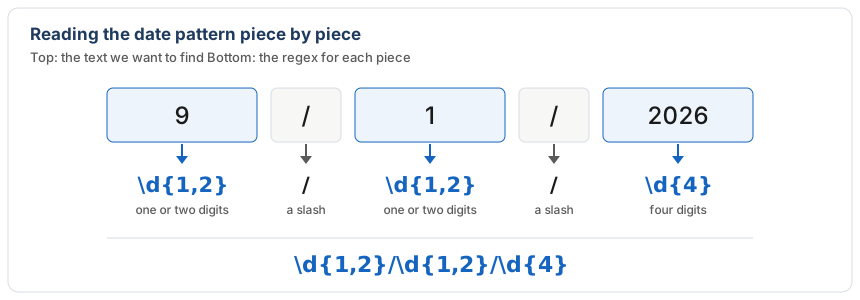
Figure 1. How each part of a date such as 9/1/2026 maps to a piece of \d{1,2}/\d{1,2}/\d{4}.
Now compare the two expressions:
\d+/\d+/\d{4}
and
\d{1,2}/\d{1,2}/\d{4}
Both match all of the dates in our example.
The second one simply expresses an additional condition: the month and day should each contain one or two digits.
The first expression is not wrong, and the second is not the only correct answer. They describe the search with different levels of specificity.
This is a useful habit when working with regex: first build something that finds what you need, then tighten or simplify the pattern if the actual data calls for it.
A regex pattern does not know whether a date is real
There is one more limitation worth understanding.
Our more specific pattern,
\d{1,2}/\d{1,2}/\d{4}
will also match something like:
99/99/2026
That is obviously not a real calendar date.
The reason is simple: a regular expression is matching a text pattern. Our pattern says only:
one or two digits, a slash, one or two digits, another slash, and four digits
It does not understand months, leap years, or the number of days in February.
It is possible to make a regex more restrictive, but the expression quickly becomes more complicated. In translation and QA work, that extra complexity is often unnecessary. Finding likely candidates and then reviewing the results may be entirely sufficient.
The useful question is therefore not “How can I make this regex mathematically perfect?” but rather “How precise does this search need to be for the job at hand?”
Why this matters in translation and QA
Even a simple pattern like this can be useful when working with long documents or large projects.
For example, you may want to find every numeric date in a document to check formatting, identify inconsistencies, or narrow down the segments that need review.
In tools that support regular expressions, one search can find many different dates instead of forcing you to search for each exact value individually.
memoQ also supports regular expressions in features such as Find and Replace and filtering in the translation editor.
That is one reason regex remains useful in translation and QA workflows: it lets us describe what a piece of text looks like, instead of already knowing exactly what the text says.
Do not memorize the finished expression
If you look only at:
\d{1,2}/\d{1,2}/\d{4}
it may look like something you need to memorize.
But that is not how we arrived there.
We started with:
\d+/
then added the day:
\d+/\d+/
then the year:
\d+/\d+/\d{4}
At that point, the search already worked.
We then decided to describe the month and day more precisely and changed the first two parts to:
\d{1,2}
That gave us:
\d{1,2}/\d{1,2}/\d{4}
There is no need to memorize one of these as the correct answer.
The same search goal can often be expressed by more than one regex. Sometimes the simpler expression is enough. Sometimes a more restrictive one is useful.
The real skill is learning to break the text you want to find into smaller pieces and combine those pieces into a pattern that suits the task.
Next in this series: from finding to replacing
So far, we have used regex only to find dates.
In the next article, we will use the same idea for replacement.
For example, we can take a date such as:
9/1/2026
and rearrange its month, day, and year into another order.
To do that, we need a way to tell the regex engine: remember this part, remember that part, and let me use those parts again in the replacement text.
That is where capture groups come in, and that is what we will look at next.