
Regular Expressions
Series: Regular Expressions — A Skill That Still Matters in the AI Era

These days, if you need a simple macro or a small program, you can often ask AI to write it for you. I rarely write code from scratch myself anymore.
There is one thing, however, that I still use directly and regularly:
regular expressions.
For many years, I learned tools such as Word VBA, Hidemaru macros, and programming languages on my own so that I could automate repetitive translation and QA tasks. I wrote quite a few small macros and utilities along the way.
After I started using memoQ, I found myself writing far fewer macros. I still use some of the ones I have accumulated over the years, particularly for work that takes place outside memoQ.
And now that AI agents and vibe coding—using natural-language instructions to have AI write code—have become commonplace, there is even less need to build everything by hand.
Regular expressions, however, are still very much part of my everyday toolkit.
There is certainly no shortage of material about regular expressions online. In this series, I would like to approach them from a slightly different angle: starting with the absolute basics and gradually looking at ways they can help with real-world translation and QA work.
What is a regular expression?
Put simply, a regular expression is a way to search for text by describing a pattern.
With an ordinary search, you look for the exact characters you enter.
For example, if you search for 25 mm, you find 25 mm.
With a regular expression, you can describe the variable part as a pattern instead. For example, you can tell the search tool to look for “one or more digits followed by a space and mm”.
That lets a single search find strings such as:
5 mm25 mm100 mm
The actual number changes, but the pattern is the same.
That is the basic idea behind regular expressions.
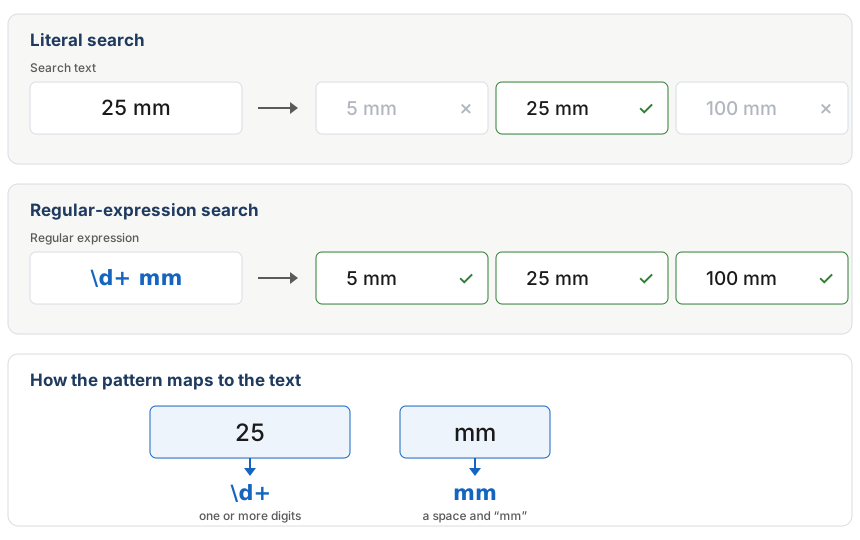
Figure 1. The difference between a literal search and a regular-expression search, and how \d+ mm maps to strings such as 5 mm, 25 mm, and 100 mm.
The very basics: four expressions to learn first
Regular expressions contain many special symbols.
At first glance, they can look a little like cryptic code. Fortunately, you do not need to memorize everything before you can start using them. In practice, a relatively small set of expressions will take you a long way.
Let us begin with just four.
| Expression | Meaning |
|---|---|
| \d | One digit |
| + | One or more repetitions of the preceding character or expression |
| {4} | Exactly four repetitions of the preceding character or expression |
| . | Any single character except a line break |
\d — one digit
The expression
\d
represents a single digit.
It can therefore match digits such as 1, 5, or 9.
+ — one or more repetitions
Now add + after \d:
\d+
This means “one or more consecutive digits”.
It can therefore match all of the following:
32510000
If we add ordinary text after it:
\d+ mm
we can match strings such as:
5 mm25 mm100 mm
This is a common kind of pattern in technical documents: the number changes, while the unit remains the same.
The important point is not to memorize \d+ as an isolated formula.
\d means “one digit”, while + means “repeat the preceding expression one or more times”. Put the two together, and you get “one or more digits”.
This is how regular expressions are best approached: build them from small pieces.
{4} — exactly four repetitions
Next, place {4} after \d:
\d{4}
This means “exactly four digits”.
For example, it can match:
2026
or
1900
Ordinary text can be combined with regular expressions as well. For example:
in \d{4}
can match:
in 1900in 2026in 2027
Instead of looking for one particular year, we are asking for the word “in” followed by a four-digit number.
. — any single character
The dot
.
matches any single character except a line break.
For example:
Figure .
can match:
Figure 1Figure 2Figure A
because each string has exactly one character after the word Figure and the space that follows it.
This makes the dot extremely useful, but also very broad. It can easily match more than you intended, so it is a good idea to check the results carefully when using it.
Regular expressions are not something you have to memorize
By this point, regular expressions may still look like a collection of unusual symbols.
But there is no need to memorize complicated expressions as complete formulas.
Take:
\d+ mm
It is simply made from three pieces:
- \d = one digit
- + = repeat the preceding expression one or more times
- mm = the literal text
mm, preceded by a space
Together, they mean:
one or more digits + a space + mm
The key is to think about what you want to find, break that pattern into smaller parts, and then assemble the corresponding expressions.
Once that idea becomes familiar, regular expressions become much less intimidating.
For people who work with large amounts of text—particularly in translation and QA—they are a modest-looking tool that can save a surprising amount of time.
Next in this series
In this first article, we looked at what regular expressions are and introduced a few of the most basic building blocks.
Next, we will try something a little more practical.
Consider dates such as:
September 2, 2026December 31, 2025January 10, 1999
Each date contains several parts that can change.
How can we find dates like these with a single regular expression, rather than searching for each one individually?
In the next article, we will add a few new pieces to what we learned here and build a regular expression for dates step by step.
Then, in the following installment, we will take the dates we find and convert them into numeric formats such as:
September 2, 2026 → 9/2/2026
for the month/day/year format commonly used in the United States, or:
September 2, 2026 → 2/9/2026
for a day/month/year format commonly used in Europe.
First, search. Then, replace.
We will expand what regular expressions can do one small step at a time.