
Regular Expressions
Series: Regular Expressions — Replacing a Phrase While Keeping the Words You Need

After a short break, we’re back with Part 4 of our regular expression series.
In the previous article, “Series: Regular Expressions — Reordering Captured Text in Replacements”, we used parentheses to capture the year, month, and day of a date, then rearranged those parts using $1, $2, and $3.
This time, we’ll apply the same technique to phrasing in an English sentence.
What Changes, and What Stays the Same?
Suppose a technical document contains expressions such as these:
| Before | After |
|---|---|
the portion where an electrode is provided | the portion on which an electrode is provided |
the part where a terminal is provided | the part on which a terminal is provided |
the section where the sensor is provided | the section on which the sensor is provided |
the surface where a wiring layer is provided | the surface on which a wiring layer is provided |
the substrate where a thin insulating wiring layer is provided | the substrate on which a thin insulating wiring layer is provided |
All five examples follow the same basic pattern:
the [word identifying a place or part] where [article] [component name] is provided
The word before where might be portion, part, section, or surface. The text after where varies too: an electrode, a terminal, the sensor, or a wiring layer. The article may be a, an, or the, and a component name may contain multiple words.
Our goal is to change only where to on which. The words identifying the location and component, along with the article, must remain intact. In other words, we want to recognize a recurring sentence pattern even when the words around where change, and replace only the part that needs changing.
One important qualification: where and on which are not interchangeable in every context. On which is appropriate only when the technical context supports the relationship expressed by on, such as a component being provided on a surface. For this example, we’ll assume that relationship has already been checked.
Why Not Search for where Alone?
A blanket replacement of where could change occurrences that have nothing to do with our intended pattern. We’re interested specifically in expressions of the form the ... where ... is provided.
So we’ll include the surrounding words in our search. But we can’t hard-code words such as part or terminal, because those words vary from one instance to another.
This is exactly where the capture groups from the previous article become useful: match the changing words as part of the search, then put them back during replacement.
Matching Non-Whitespace Characters with \S
Previously, we used \d to match a single digit. This time, we’ll use \S to match the positions occupied by words.
\S matches one non-whitespace character. Add the + quantifier, meaning “one or more,” and we get:
\S+
This matches an uninterrupted sequence of non-whitespace characters, such as portion, part, section, electrode, or terminal.
A note on punctuation: \S matches symbols too
\S is not limited to letters. Hyphens and slashes are non-whitespace characters, so heat-resistant and input/output can each be matched as a single sequence by \S+. Commas and periods count as well, however. Think of \S+ as a way to match characters up to the next whitespace, not as a reliable way to identify a linguistic “word.”
Capturing the Words We Want to Keep
Let’s start with just the first example: the portion where an electrode is provided.
Find
the (\S+) where an (\S+) is provided
Replace
the $1 on which an $2 is provided
The parts enclosed in parentheses become values we can reuse in the replacement.
The search also contains the, where, an, and is provided, but these are not inside capture groups. In the replacement, we write on which in place of where, then restore portion and electrode with $1 and $2.
The same pattern can capture part or section instead of portion, provided it is a single uninterrupted sequence. At this stage, though, the article is still fixed as an.
Using | to Match a, an, or the
Next, let’s account for different articles. To match an electrode, a terminal, and the sensor, we can use the vertical bar |.
(a|an|the)
This means “a, an, or the.” Since the alternatives are enclosed in parentheses, we can also reuse whichever article matched.
Find
the (\S+) where (a|an|the) (\S+) is provided
Replace
the $1 on which $2 $3 is provided
With three capture groups, we now have three values to retrieve.
| Group | What it captures | In the section where the sensor is provided |
|---|---|---|
| $1 | The word before where | section |
| $2 | The article (a, an, or the) | the |
| $3 | The word after the article | sensor |
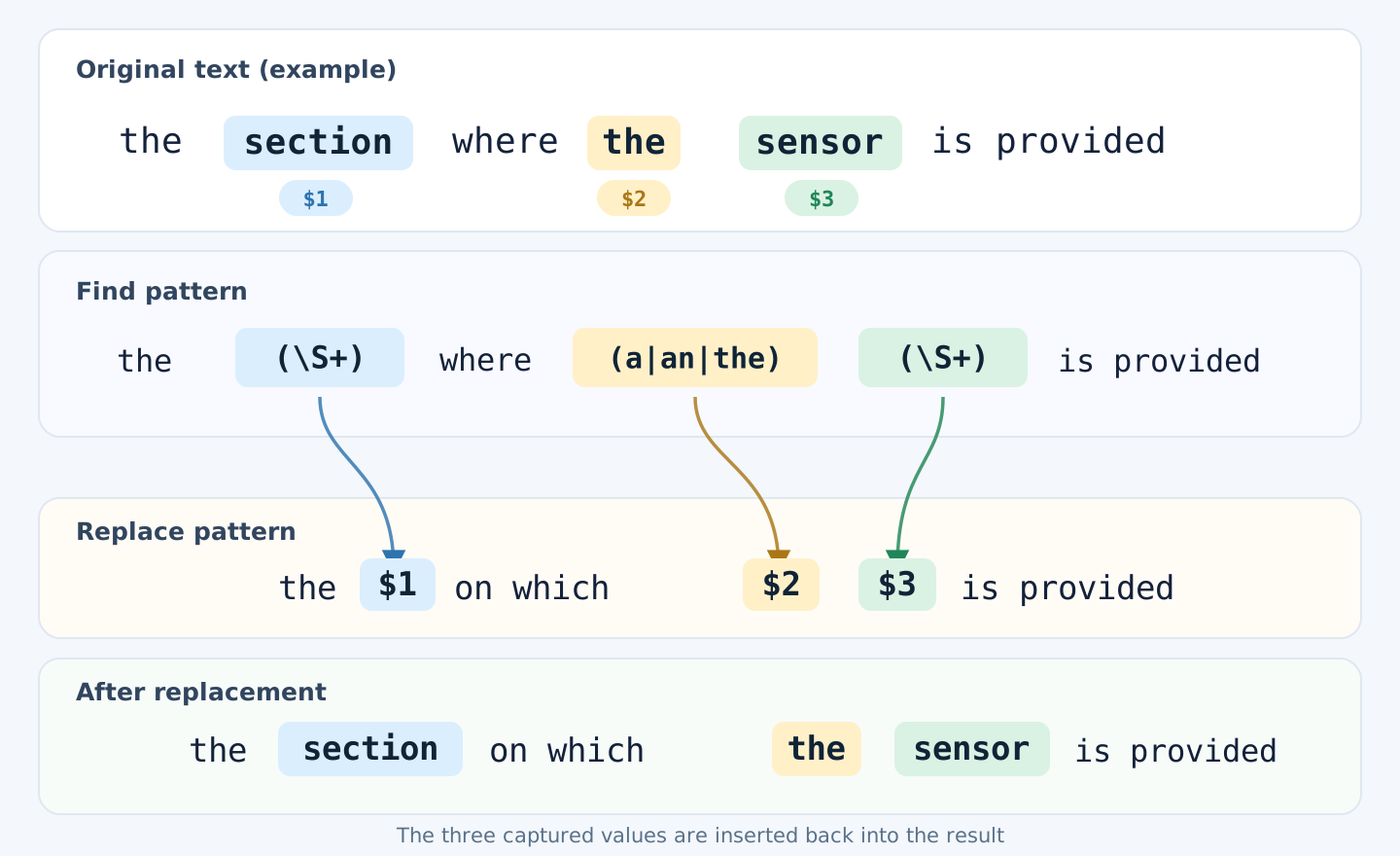
Only the captured parts are inserted back into the replacement, preserving the original article and component name.
The three examples involving an electrode, a terminal, and the sensor all match this expression. We are not supplying a new article in the replacement: $2 puts back the one found in the original sentence, preserving the distinction between a, an, and the.
Handling Multiword Names with [^…] and +?
So far, \S+ stops at whitespace. It therefore cannot capture an entire multiword component name in examples such as:
the surface where a wiring layer is provided
the substrate where a thin insulating wiring layer is provided
How can we allow spaces inside the component name without letting the match run into the next sentence?
Exclude punctuation and line breaks, not spaces
A caret ^ at the beginning of a character class means “any character except those listed.” For example:
[^\s.,;:!?]+
This excludes \s (whitespace) as well as the listed punctuation marks. By itself, it still cannot capture wiring layer as one sequence, because there is a space between the words.
For the component-name portion of this expression, we’ll allow spaces but exclude punctuation and line breaks instead:
[^.,;:!?\r\n]+
This excludes periods, commas, semicolons, colons, exclamation marks, question marks, and the line-break characters \r and \n. Ordinary spaces remain valid, so the pattern can match both wiring layer and thin insulating wiring layer.
Notice that ^ means “exclude” inside the character class here. Outside that context, ^ can instead be used to anchor a match at the start of a string.
Use +? to stop at the first is provided
Allowing spaces creates another issue: if is provided occurs more than once in the same sentence, a greedy + may extend the match too far. We can change it to +?:
[^.,;:!?\r\n]+?
+? still means “one or more,” but asks the engine to try the shortest possible match first. With is provided following it, the match can finish at the first occurrence that satisfies the entire expression. The listed punctuation and line breaks still act as boundaries.
Here is the resulting search pattern:
Find
the ([^\s.,;:!?]+) where (a|an|the) ([^.,;:!?\r\n]+?) is provided
Replace
the $1 on which $2 $3 is provided
For the surface where a wiring layer is provided, $3 contains wiring layer. For the substrate where a thin insulating wiring layer is provided, it contains thin insulating wiring layer. We no longer need to limit component names to one or two words.
Even a Lazy Match Needs Reviewing
In the following sentence, $3 captures only wiring layer, because the first is provided completes the match:
the surface where a wiring layer is provided and a protective film is provided
In this example, the pattern does not cross the period to reach a later sentence:
the surface where a wiring layer is formed. A protective film is provided
But consider this sentence:
the surface where a wiring layer is formed and a protective film is provided
Here, $3 captures wiring layer is formed and a protective film. There is no excluded punctuation between the component name and the later is provided, so the text satisfies the pattern.
In other words, the expression can find patterns containing multiword component names, but it cannot tell where a noun phrase ends and other grammatical structures begin. Unexcluded symbols and unusual formatting may also need attention.
Nor does the pattern cover every variation: it does not handle a multiword expression before where, or a construction without an article. Most importantly, whether replacing where with on which preserves the technical meaning must still be determined from the surrounding text and, where relevant, the drawings.
Use regex to find candidates, then replace only the occurrences you have checked. This is especially important in patent specifications and other technical documents.
Key Points from This Article
| Expression | Meaning |
|---|---|
| \S | Matches one non-whitespace character |
| \s | Matches one whitespace character, such as a space, tab, or line break |
| | | Means “or”; useful for specifying alternatives such as articles |
| [ ] | Matches one of the characters listed inside the brackets |
| [^ ] | Matches a character not listed inside the brackets |
| +? | Matches one or more occurrences, trying the shortest match first |
In our example, we allowed spaces within multiword names while excluding selected punctuation and line breaks.
Find
the ([^\s.,;:!?]+) where (a|an|the) ([^.,;:!?\r\n]+?) is provided
Replace
the $1 on which $2 $3 is provided
In the previous article, we captured and rearranged parts of a date. Here, we captured variable words and articles, then restored them after changing the expression. We also saw why a reliable search requires decisions about where spaces are allowed, which punctuation should act as a boundary, and where the match should stop.
Next: Applying These Techniques in memoQ
Across the first four articles, we’ve covered the essentials of regex searching and replacement. Next, we’ll move into the memoQ translation editor and look at how to use Find and Replace and text filters to locate candidate expressions, review the results, and make changes only where appropriate.